You have spent hours building the perfect event. You have set up your Facebook ad campaign, written the copy, and hit publish, only to watch the registrations trickle in at a painfully slow pace while your budget disappears. Sound familiar?
You’re not alone. The vast majority of Facebook event ads fail, not because Facebook ads don’t work, but because of a handful of avoidable mistakes that silently kill conversions and drain budgets. Studies consistently show that over 60% of event ad budgets are wasted due to poor targeting, weak creative ads, or incorrect campaign setup.
In this guide, you will learn:
- The 10 most common Facebook event ads mistakes marketers make
- Exactly why each mistake is costing you registrations
- Step-by-step fixes you can implement today
- Best practices for webinars, workshops, product launches, and live events
Whether you are running a virtual summit, an in-person workshop, or a product launch event, this guide will help you stop wasting budget and start filling seats.
Tap to listen
What Are Facebook Events Ads & How Do They Work?
Facebook events ads are paid advertisements specifically designed to promote events, online or offline, and drive people to register, RSVP, or purchase tickets. They appear across the Facebook and Instagram feeds, Stories, and Audience Network, targeting users most likely to be interested in your event.
There are two main types of Facebook event ads, and understanding the difference is critical:
Event Response Ads
Event response ads are tied directly to a Facebook Event page. When a user clicks, they can mark themselves as ‘Interested’ or ‘Going’ within Facebook. These are great for building awareness, social proof, and organic reach, but they don’t drive off-platform registrations.
Best For
Awareness campaigns, free community events, building FOMO, and social proof before a launch.
Conversion Ads
Conversion ads send users to an external landing page, your registration form, Eventbrite, or sales page, and optimize for a specific action like a form submission or purchase. These are the gold standard for generating actual paid or free event registrations.
Best For
Webinars, paid workshops, product launch events, conferences, and any event where you need an external sign-up.
Knowing when to use each type is one of the most important decisions you’ll make, and one of the most commonly botched.
How To Create Facebook Event Ads That Actually Convert
Before diving into the mistakes, here’s a quick overview of the correct setup process:
- Choose the Right Campaign Objective, Use Leads or Conversions (not Traffic or Engagement) for registration-focused events.
- Set Up Your Pixel & Conversion API, Track registrations server-side to give Facebook the data it needs to optimize.
- Build Audience Segments, Create cold (interest-based), warm (website visitors), and hot (email list) audiences separately.
- Design Scroll-Stopping Creative, Use short-form video, bold headlines, and clear event details (date, time, value proposition).
- Write a Direct CTA, ‘Register Free,’ ‘Save Your Seat,’ or ‘Join the Workshop,’ which outperforms vague CTAs like ‘Learn More.’
- Match Your Ad to Your Landing Page. The headline, offer, and visual style must be consistent from ad click to confirmation page.
Now, let’s look at where most people go wrong.
10 Common Facebook Events Ads Mistakes (With Fixes)
1. Targeting the Wrong Audience in Facebook Events Ads
❌ Problem: Many advertisers default to broad interest targeting, ‘entrepreneurs aged 25-55 in the US’, and wonder why their cost per registration is sky-high. Broad targeting wastes budget on users who have no real connection to your offer, leading to low CTR and poor conversion rates.
✅ Fix: Build a layered audience strategy. Start with Custom Audiences (email list, website visitors, video viewers) for warm traffic. Then create Lookalike Audiences based on your past event registrants or buyers, these are statistically similar to people who’ve already converted. Reserve cold interest-based targeting for the top of the funnel only, and keep ad sets separated by audience temperature.
Pro Tip
Upload your past registrant list to Facebook and create a 1% Lookalike Audience.
This is consistently one of the highest-performing audiences for event promotion.
2. Not Using Facebook Ads Event Manager Properly
❌ Problem: Running event ads without proper tracking is like driving with your eyes closed. If your Facebook Pixel isn’t firing on your registration confirmation page, or if you haven’t set up the Conversions API, Facebook has no data to optimize your campaign. You’ll overpay for unqualified clicks, and Facebook’s algorithm will never learn who actually registers.
✅ Fix: Set up both the Facebook Pixel AND the Conversions API (CAPI). The Pixel tracks browser-side events; CAPI tracks server-side, capturing conversions that browser ad blockers and iOS privacy changes would otherwise miss. In Facebook Ads Event Manager, create a custom conversion for your ‘Thank You’ or confirmation page URL. Verify your events are firing using the Test Events tool before launching your campaign.
Critical Setup Checklist
- Pixel installed on all pages
- Custom conversion created for registration confirmation URL
- Conversions API connected via your CRM or partner integration
- Events verified in the Test Events tool
3. Optimizing for Clicks Instead of Conversion Events
❌ Problem: Choosing the Traffic objective because you ‘just want people to visit your page’ is one of the most expensive mistakes in event advertising. Facebook optimizes for what you tell it to; if you optimize for link clicks, it will find people who click links. Those people are not necessarily people who register for events.
✅ Fix: Always use the Conversions or Leads objective for registration-focused event campaigns. Set your optimization event to ‘Complete Registration’ or ‘Lead,’ depending on how you’ve set up your confirmation tracking. If you have fewer than 50 conversions per week, use the Leads objective or optimize for a higher-funnel event (like ‘View Content’) temporarily until your pixel has enough data.
4. Using Weak Creatives That Don’t Stop the Scroll
❌ Problem: Static images with walls of text, low-resolution graphics, or generic stock photos don’t stop the scroll. In a crowded feed, your creative has roughly 1.7 seconds to grab attention. If it looks like a corporate flyer, users will keep scrolling.
✅ Fix: Invest in scroll-stopping creative. Short-form video (15–30 seconds) consistently outperforms static images for event ads. Lead with your hook in the first 3 seconds, call out your target audience, or the painful problem your event solves. User-generated content (UGC) and behind-the-scenes footage drive strong engagement and trust. For static ads, use bold contrasting colors, large readable text, and a single clear focal point. Always test 3–5 creative variations simultaneously.
Creative Formula That Works
Hook (who it’s for + what they’ll get) → Social proof (attendees, speakers, past results) → CTA (register now, seats limited).
5. No Clear CTA in Your Event Ads Facebook Campaigns
❌ Problem: Ads that end with ‘Find out more’ or ‘Click here’ leave users wondering what they’re supposed to do. Ambiguous calls-to-action create decision friction, which translates directly to lower click-through rates and higher cost per registration.
✅ Fix: Use specific, action-driven CTAs that tell people exactly what happens next. ‘Register Free, Limited Spots’ is dramatically more effective than ‘Learn More.’ Match your CTA button in Facebook Ads Manager to your copy: use ‘Sign Up,’ ‘Get Tickets,’ or ‘Register’ rather than the default ‘Learn More.’ Include urgency and value in your CTA copy wherever possible.
Recommended Reads
10 Social Media Trends You Can’t Ignore in 2026
Creative Ads: The Ultimate Guide to Making Ads That Actually Stop the Scroll
6. Mixing Cold, Warm, and Hot Audiences Together
❌ Problem: Putting cold audiences (people who’ve never heard of you), warm audiences (website visitors, video viewers), and hot audiences (email subscribers, past buyers) into the same ad set creates optimization chaos. Facebook ends up showing your re-engagement ad to cold strangers, and your awareness ad to people who are already ready to buy.
✅ Fix: Segment your audiences into separate ad sets, or better yet, separate campaigns, based on funnel temperature. Cold audiences need awareness-focused messaging that sells the event’s value and builds curiosity. Warm audiences need social proof and urgency. Hot audiences (your email list, past attendees) need a direct registration push with a strong offer. Use audience exclusions to prevent overlap between segments.
7. Ignoring Facebook Event Response Ads Strategy
❌ Problem: Using Event Response ads for everything, including paid registrations, is a costly mistake. Event Response ads optimize for people who click ‘Interested’ on Facebook, which rarely correlates with people who actually register on your external page. You end up with inflated vanity metrics and empty seats.
✅ Fix: Use Event Response ads strategically for awareness and social proof generation at the top of the funnel. Run them 2–3 weeks before your event to build up your Facebook Event page’s attendee count, which creates social proof. Then retarget everyone who engaged with your Event Response ad using a Conversion campaign that drives them to your actual registration page.
8. Budget Spread Too Thin Across Ad Sets
❌ Problem: Running 8 ad sets with $5 each ($40/day total) prevents any single ad set from exiting Facebook’s learning phase, which requires at least 50 optimization events in 7 days. Without enough data, Facebook’s algorithm never optimizes properly, and your CPRs stay high.
✅ Fix: Consolidate your budget. Rather than 8 ad sets at $5/day, run 2–3 ad sets at $15–20/day each. This concentrates spending and helps ad sets exit the learning phase faster. Use Campaign Budget Optimization (CBO) to let Facebook automatically allocate budget toward the best-performing audiences. Set a minimum spend floor on important audiences so they don’t get starved of budget.
Learning Phase Tip
Facebook needs 50 optimization events per ad set within 7 days to exit the learning phase.
If your event is only running for 2 weeks, budget accordingly—you may need to optimize for a higher-funnel event to gather data faster.
9. Not A/B Testing Facebook Events Ads
❌ Problem: Running one ad and hoping it converts is not a strategy. Without testing, you have no idea if a different headline, visual, or audience would deliver 2x or 3x better results. Most advertisers are leaving enormous performance gains on the table.
✅ Fix: Run structured A/B tests on one variable at a time: creative (video vs. static), headline (problem-focused vs. benefit-focused), audience (interest-based vs. lookalike), or CTA copy. Use Facebook’s built-in A/B testing tool for statistically valid results. Commit to testing at least 3 ad creatives per campaign. After 500+ impressions per variant, start pruning underperformers and scaling winners.
10. Ad & Landing Page Message Mismatch
❌ Problem: Your ad promises ‘a free masterclass on scaling to $10K/month,’ but your landing page talks about ‘a comprehensive business training program.’ The disconnect between what the ad promises and what the landing page delivers creates cognitive dissonance. Users bounce, and your conversion rate tanks.
✅ Fix: Maintain message match from ad to landing page to confirmation email. The headline, visual style, tone, and specific offer must be consistent across every touchpoint. If your ad says ‘Free Workshop: Thursday at 7 PM EST,’ those same details should be the first thing visible on your landing page. Run a 5-second test: show your landing page to someone for 5 seconds, then ask them what they think the event is about. Their answer should match your ad exactly.
Bonus Tips To Improve Facebook Events Ads Performance
Retargeting Strategies That Fill Seats
Don’t let warm traffic go cold. Build retargeting audiences from:
- People who visited your event page but didn’t register (show urgency-based ads with countdown timers)
- Video viewers who watched 50%+ of your event promo video (they’re interested, give them a stronger reason to commit)
- People who clicked your ad but didn’t convert (test a different angle or offer)
Leverage Social Proof Aggressively
Nothing converts a fence-sitter like social proof. Use:
- Testimonial ads featuring past attendees sharing specific results
- ‘Join 2,400+ attendees’ in your headline when your registrant count is high enough
- Speaker credibility callouts (‘As seen in Forbes, Inc., and Entrepreneur’)
- Live countdown ads showing ‘Only 47 seats remaining.’
Create Real Urgency
Manufactured urgency (‘act now!’) doesn’t work. Real urgency does:
- Genuine limited seat counts with accurate numbers
- Countdown timer landing pages (tools like Deadline Funnel integrate with Facebook tracking)
- Early-bird pricing that actually expires
- Bonus offers for the first X registrants
Facebook Events Ads Best Practices (Quick Checklist)
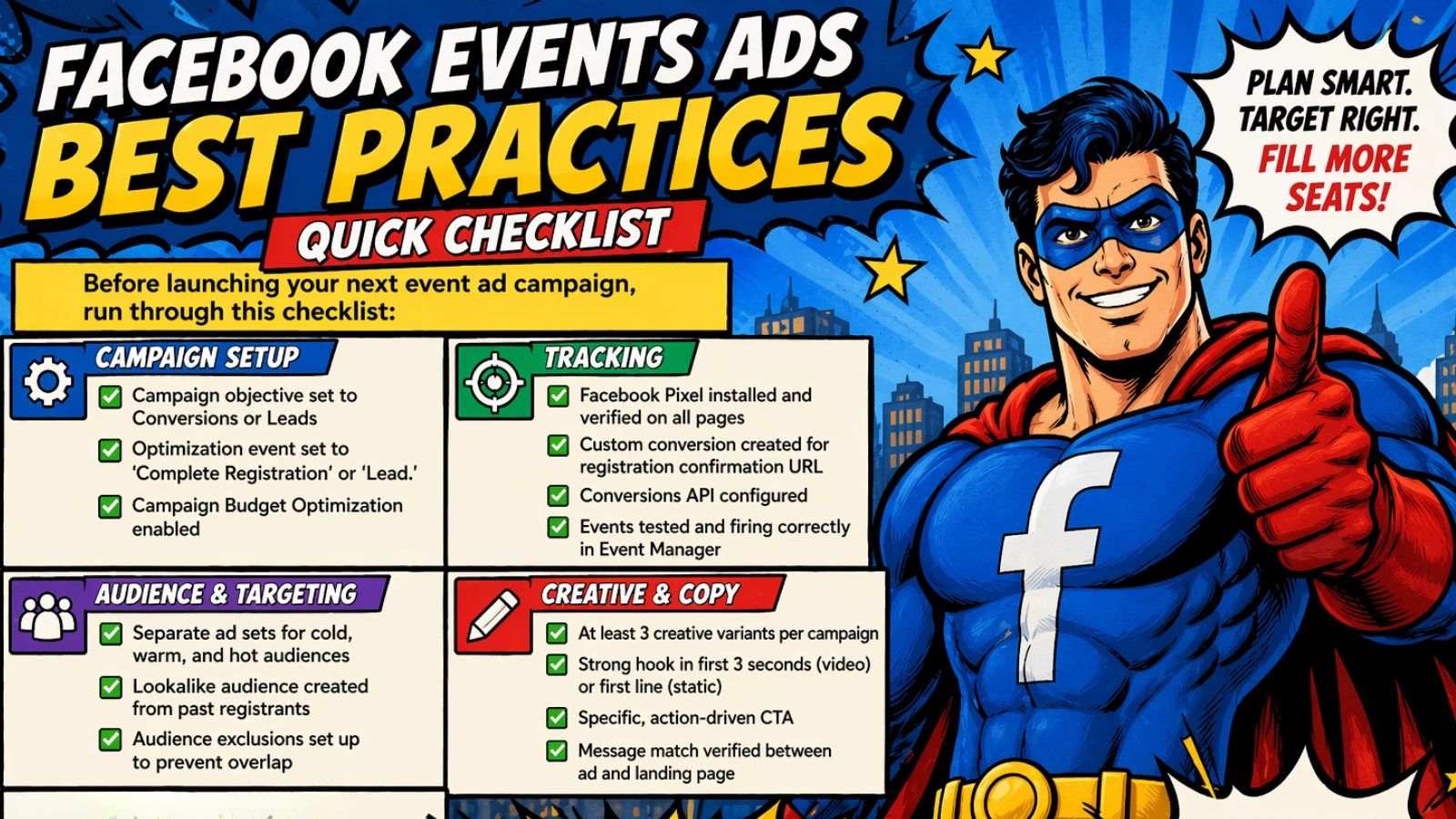
Before launching your next event ad campaign, run through this checklist:
Campaign Setup
✅ Campaign objective set to Conversions or Leads
✅ Optimization event set to ‘Complete Registration’ or ‘Lead.’
✅ Campaign Budget Optimization enabled
Tracking
✅ Facebook Pixel installed and verified on all pages
✅ Custom conversion created for registration confirmation URL
✅ Conversions API configured
✅ Events tested and firing correctly in Event Manager
Audience & Targeting
✅ Separate ad sets for cold, warm, and hot audiences
✅ Lookalike audience created from past registrants
✅ Audience exclusions set up to prevent overlap
Creative & Copy
✅ At least 3 creative variants per campaign
✅ Strong hook in first 3 seconds (video) or first line (static)
✅ Specific, action-driven CTA
✅ Message match verified between ad and landing page
Budget & Testing
✅ Budget consolidated to allow learning phase completion
✅ A/B test structured around a single variable
✅ Retargeting campaigns set up for warm traffic
How PowerAdSpy Can Improve Your Facebook Events Ads
If you’re struggling to create high-performing Facebook ads, using an ad intelligence tool like PowerAdSpy can give you a major advantage. It allows you to analyze what’s already working in the market so you don’t have to guess.
Instead of testing blindly, you can model proven ad strategies and improve your results faster.
Key Features of PowerAdSpy
Ad Intelligence Database: Access a large collection of live and past Facebook ads across different niches to find winning creatives.
Advanced Search & Filters: Filter ads by keywords, engagement, call-to-action, ad type, and more to find relevant event ad examples.
Competitor Ad Analysis: Spy on competitors’ Facebook ads to understand their creatives, copy, and funnel strategy.
Engagement-Based Sorting: Identify top-performing ads based on likes, shares, and comments to spot winning campaigns.
Landing Page Insights: View the landing pages behind ads to understand full funnel strategies and improve your conversions.
Creative Inspiration for Ads: Discover high-converting ad formats, hooks, and visuals to improve your own event campaigns.
Final Thoughts: How To Fix Your Facebook Events Ads Fast
The good news: every single mistake in this guide is fixable, usually within a single afternoon of campaign optimization.
- The biggest shifts that move the needle fastest are:
- Fix your tracking first. Without data, nothing else matters. Get your Pixel and Conversions API working correctly before spending another dollar.
- Consolidate your audiences. Stop spreading the budget across 10 micro-audiences. Three well-funded segments will outperform ten starved ones.
- Match your message. Audit your ad-to-landing-page flow right now. If there’s any disconnect in the offer, headline, or visual style, fix it immediately.
- Test your creativity. Your first ad is a hypothesis, not a final answer. Build a testing habit and let data, not opinions, determine what runs.
The advertisers who consistently fill their events aren’t necessarily the ones with the biggest budgets. They’re the ones who track obsessively, test systematically, and optimize relentlessly.
Start with one fix from this list today. Measure the result. Then implement the next one. That’s the optimization mindset that separates full events from empty ones.
FAQs About Facebook Events Ads
What are Facebook Event Response Ads?
Facebook Event Response Ads are ad units linked directly to a Facebook Event page that allow users to click ‘Interested’ or ‘Going’ without leaving Facebook. They are best used for building awareness and social proof at the top of the funnel, not for driving off-platform registrations.
How do I track event registrations in Facebook Ads Manager?
To track event registrations, install the Facebook Pixel on your website and create a Custom Conversion based on your registration confirmation page URL (e.g., yourdomain.com/thank-you). Additionally, set up the Conversions API to capture registrations that the Pixel might miss due to browser privacy restrictions. Verify your setup using the Test Events tool in Facebook Ads Event Manager before launching.
Which objective is best for Facebook events ads?
For most event campaigns focused on driving registrations, the Conversions objective (optimizing for ‘Complete Registration’) or the Leads objective is best. Avoid the Traffic objective, which optimizes for clicks rather than registrations and typically delivers lower-quality audiences.
How much budget is needed for Facebook event ads?
As a general guideline, you need enough budget to generate at least 50 optimization events per ad set within 7 days (to exit Facebook’s learning phase). If your average cost per registration is $10, you’d need at least $500/week per ad set. Start with $20–30/day per ad set minimum, consolidate to 2–3 ad sets, and scale what’s working. For smaller budgets, consider optimizing for a higher-funnel event (like ‘View Content’) to gather data faster.
How far in advance should I run Facebook event ads?
For most events, start running ads 3–4 weeks before the event date. This gives you time to exit the learning phase, gather conversion data, iterate on underperforming ads, and build retargeting audiences from warm traffic. For larger events or conferences, starting 6–8 weeks out gives you more optimization runway.