A pitch for investors should start with the context and then move on to the detailed metrics, forecasts, and financial figures. A strong opening can provide an explanation of the business and why the opportunity is important. Video brings movement, pacing, sound, and visual structure to what static slides can’t do on their own. Pippit can help you take prompts, references, and media and make it into a polished video concept for your presentation. The goal is not to try to substitute the pitch deck or proof. The opening video, rather, can provide a short storyline that leads into the presentation. Appropriate graphics can link the problem, solution, market opportunity, and overall company goal. This way, investors have a better starting point when they go through detailed business information.
Why an Investor Deck Intro Can Benefit from Video
A short video helps to get a company off and going quicker than the thick opening slides. An AI video generator can integrate images, motion, typography, narration, and transitions into a coherent beginning. Pippit enables this creative process by converting prompts and uploaded media into video concepts. Visual storytelling can set up an environment prior to the presentation of specific business claims. Movement can direct attention to the key components without the need for complex slide designs. The pacing also allows you to intentionally set up a rhythm between the opening statement and first presentation slide. But an investor introduction is not an advertising video that is primarily focused on conversions. Investors want to be informed and know how the information applies to them, not be made to feel they have to invest simply because they are feeling good. So, visuals should be kept to a minimum and the messaging tight throughout the opening. Don’t make the sequence too long, or it will become another presentation; it must fit the pitch.

Build the Narrative Before Writing the AI Video Prompt
Visuals should be preceded by a logical narrative since visuals require an investment purpose. Pippit can read into the creative direction. If needed, you can use Seeworld for conceptual planning. First, pinpoint the initial tension, which can be an ineffective process, a new need, or a market gap. Next, introduce the company premise by means of product interfaces, relevant environments, or well-chosen conceptual imagery. Differentiation may be accomplished by using visual contrast, letting viewers know how the proposed approach will differ from what is currently in place. Market potential can drive forward momentum through abstract scale, expansion of environments, or pertinent industry graphics. The brand reveal should then create a memorable identity before moving onto the deck. The clean ending may be similar to the first slide in design and provide continuity of look. This structure helps to avoid “disjointed” scenes and ensures that each visual is related to the investment story.

Steps to Use Pippit’s AI Video Generator Online
Step 1: Set Up Your Investor Introduction
-
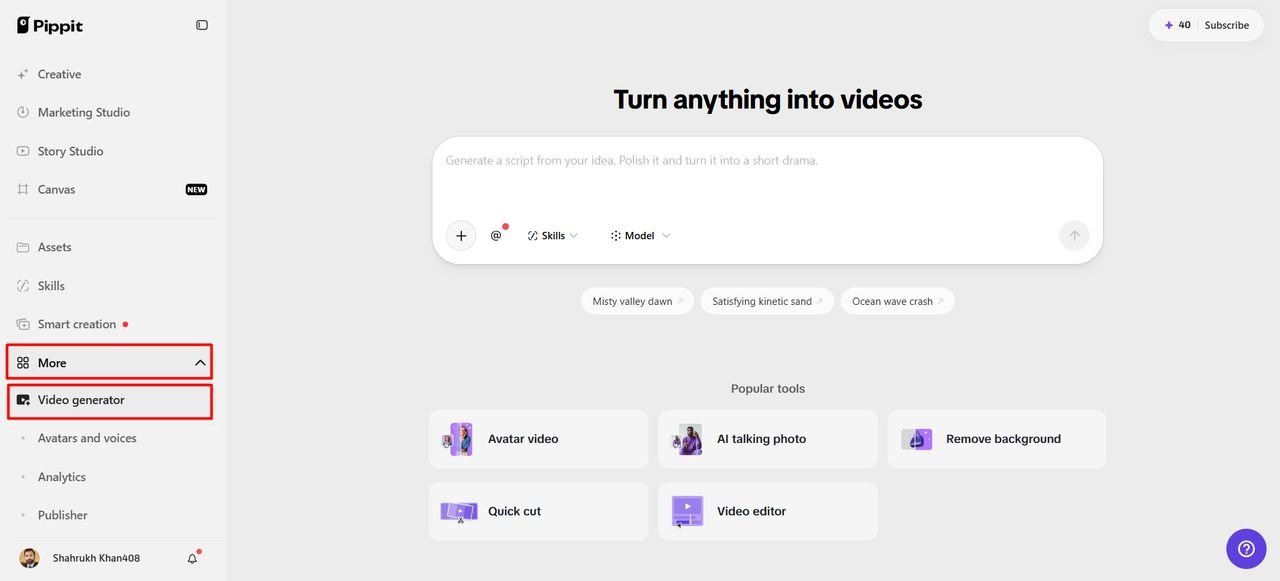
Log in to Pippit using Google or social media before starting your investor deck introduction.
-
Open “Video generator” from the left menu under the “More” tab to begin creating videos.
Step 2: Build Your Investor-Focused Opening
-
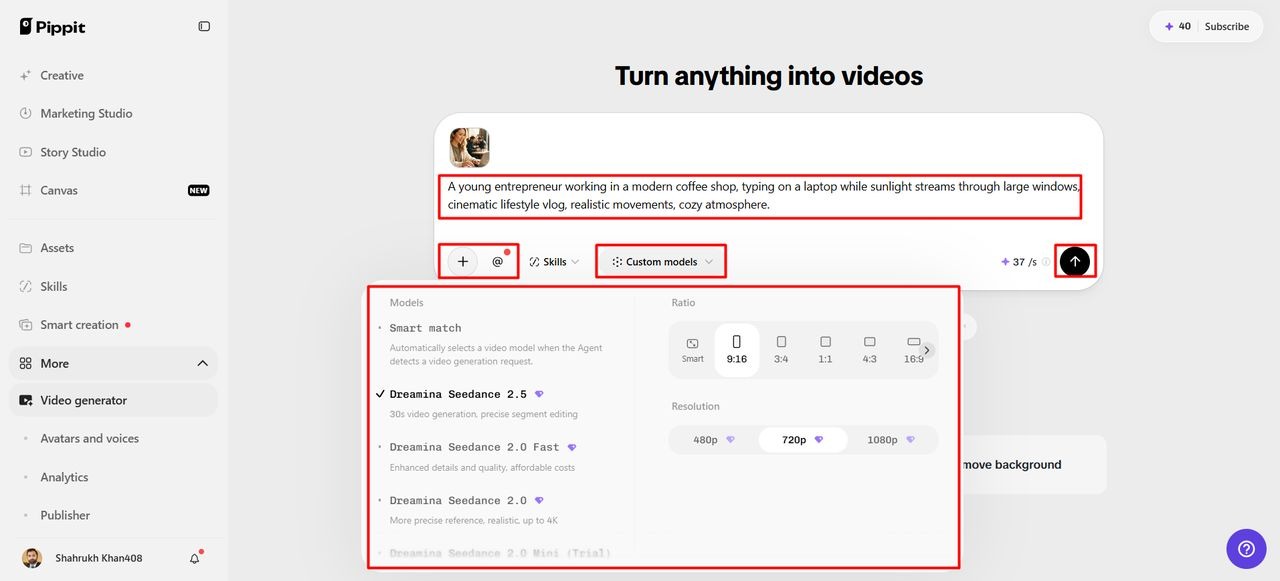
Select an AI model suited to producing polished visuals for your planned investor presentation opening.
-
Choose “Dreamina Seedance 2.5”, “Dreamina Seedance 2.0”, or “Dreamina Seedance 2.0 Fast” for investor-video generation.
-
Other available choices include “Dreamina Seedance 2.0 Mini”, “Dreamina Seedance 1.0”, and “Auto Route” routing.
-
Enter a detailed prompt describing your company, audience, message, visuals, timing, and desired introduction sequence.
-
Click “+” to upload reference images or videos from your device, phone, Dropbox, or link.
-
You can also select assets when suitable reference media is unavailable for your planned introduction.
-
Choose an aspect ratio under “Ratio” and select output quality under “Resolution” before generation starts.
-
Use “@” to tag a media item or photo inside your prompt for accurate referencing.
-
Confirm every setting carefully, then click “Generate” to begin creating your investor presentation opening now.
Step 3: Refine and Export Your Pitch
1. Preview your video result and decide whether further adjustments are needed for the investor outcome.
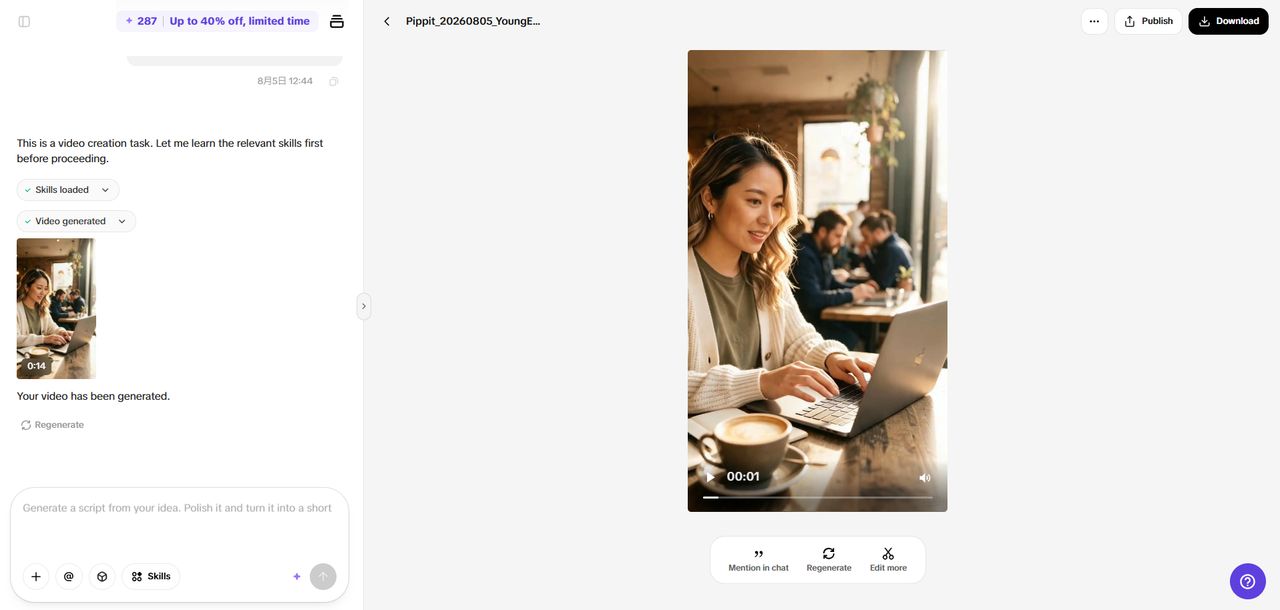
2. Click “Regenerate” when the result does not communicate your investment message clearly enough for investors.
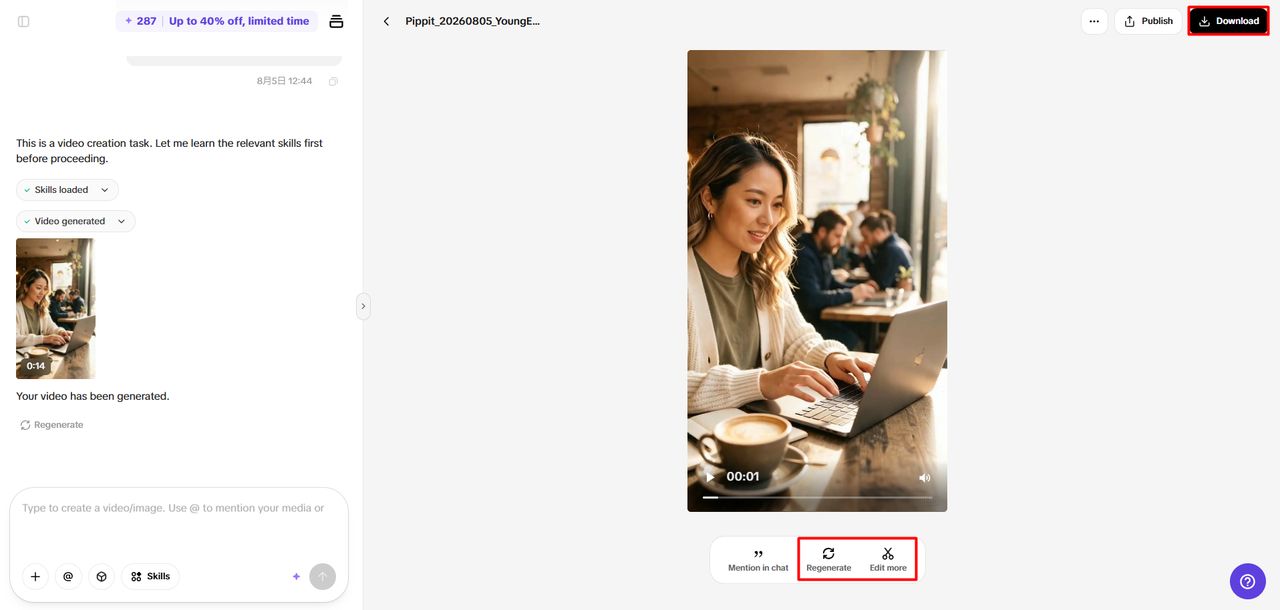
3. Click “Edit more” to refine your introduction using Pippit’s available AI editing tools for presentations.
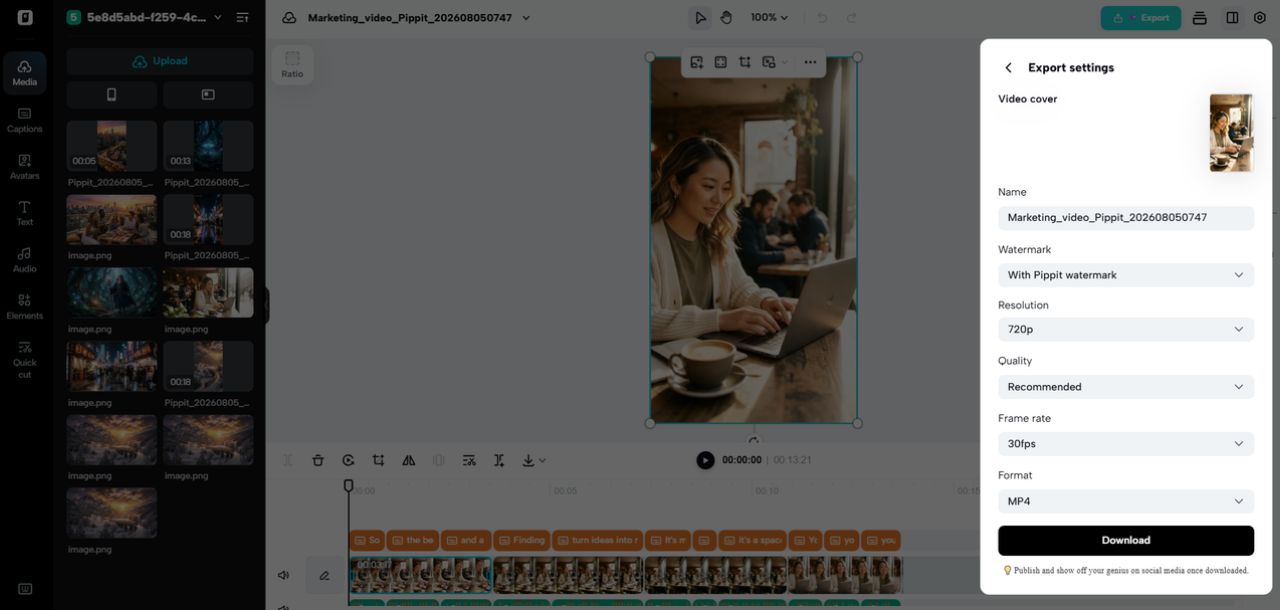
4. Customize captions manually, add text, and adjust size, color, alignment, filters, and effects as needed.
5. Add background music, remove backgrounds, and fine-tune visuals to match your investor presentation requirements closely.
6. Click “Download” to export the finished investor introduction directly onto your local device for use.
7. To share online, click “Publish” to schedule and post your video across social media channels.
Prompt Architecture for an Investor-Ready Deck Introduction
A structured prompt will give more creative direction than a generic business video request. Start with the company context, target audience, presentation purpose, and central investment story. Then explain the initial image that conveys the problem, opportunity, and/or relevant environment. Camera directions need to be intentional, including controlled transitions, tracking, panning, or zooming. The style should be visual and consistent with the current brand rather than creating an unrelated film identity. When lighting, composition, pacing, and environmental details affect the desired presentation, be sure to mention them. Explain transitions clearly to make the scenes flow together. When the company has product images or branding, references can offer a visual clue. Exclusions are also relevant, as they can exclude irrelevant objects, unsupported claims, or misleading visual representations. Avoid using factual business information behind decorative graphics unless the figures have been carefully verified. By providing a clear, specific cue, Pippit is afforded more creative constraints, but also space for incremental changes.
Align AI-Generated Video with the Existing Pitch Deck
The first video needs to be a part of the pitch and not an out-of-the-blue creative piece. Ensure typography, aspect ratio, colours, imagery, and visual rhythm match the existing presentation. A consistent design allows investors to flow smoothly from moving to static information. The tone of the video should also be aligned with the stage of the company, the industry it operates in, and the purpose of the presentation. Restrained interface visuals might be necessary for a technical startup, and more environmental context might be needed for a consumer concept. Do not add effects just because they are available in the generation system. Consistency of visuals typically has a greater impact than too many transitions, animations, or frills. Check all generated representations for factual information, product correctness, and brand consistency before showing. After generating, Pippit’s editing features allow you to edit captions, layouts, effects, music, and much more. The final transition should be seamless rather than requiring investors to “reset” their minds from one format to another.
Mistakes to Avoid When Creating Investor Pitch Intros
Don’t put valuation, revenue, traction, market size, and product claims in one short sequence. If there is too much information, the opening may not be clearly understood before the main presentation. Dramatic pictures should never suggest anything that the company cannot support. It’s easy to feel like pitches are interchangeable when using generic office scenes, handshake images, and abstract technology graphics. Rather, rely on visuals relating directly to the problem, product, market, or operating environment. When narration and presentation commentary are used simultaneously, background music should be subservient to narration and presentation commentary. The branding should be consistent throughout the video, in the title slide, typography, colors, and presentation items. Inaccurate interfaces, objects, proportions, or contextual details can also be part of an AI-generated scene. Go over those elements prior to screening the video with investors. Think of each generation as an iteration and not the final product.
Make the Intro Support the Investment Narrative
The best opening sets up a clear path to the next piece of evidence that investors need. Sequences should be used to set up context and then allow the deck to present detailed evidence and facts about the business.
-
Problem: Present the meaningful challenge and why there is room for improvement in existing approaches.
-
Solution: Showcase the company’s offering and how it meets the challenge identified.
-
Why now: Create a sense of relevance based on technology changes, market changes, regulations, or user behavior changes.
-
Market: Shift to the size of the opportunity, relevance, segments, and supporting market evidence.
-
Business model: How does the business translate its proposition into viable economic value?
-
Traction: Show measurable progress in demand, adoption, revenue, partnerships, or other areas of progress.
-
Vision: End opening story with a link to the company’s overall vision.
Conclusion
An investor video introduction should enhance the pitch story, but not be the pitch. Pippit can transform prompts, references, and existing media into an editable video concept. The best results rely on short stories, facts, consistent branding, and deliberate pacing. A well-thought-out order of presentation can set the tone before investors delve into the specifics of the numbers and the evidence. Ensure all scenes are relevant to the company’s proposition and do not imply anything that is not backed up. The video naturally flows into the deck, making it a great opening layer. This helps to develop a focused presentation experience and maintain a clear and purposeful investment narrative.