Most of what an ad spy tool returns on a raw keyword search is noise. I’ve watched media buyers spend an afternoon bookmarking ads, build a campaign off them, and wonder why performance tanked — because they were copying ads that ran for four days, failed, and got killed. The database swallowed those corpses whole, and no one thought to check.
This is the single most common misuse of ad intelligence tools, and it’s fixable in about two minutes of filter discipline. But first, you need to understand why the default search experience is set up to deceive you.
Listen to this podcast!
Archives vs. Intelligence: Why the Default View Lies
An ad spy tool at its core is a searchable archive. PowerAdSpy indexes 500M+ ads across 10 ad networks — Facebook, Instagram, Google PPC, YouTube, Native, Display, Reddit, Quora, Pinterest, and LinkedIn — with 500K+ new ads added daily. That scale is genuinely useful. But scale without filtering is just a bigger haystack.
The intelligence layer — the part that separates a winning ad from a dead one — comes from how you sort and filter that archive. One industry analysis put it bluntly: ad spy archives surface ads, while competitor intelligence tools add a scoring layer that connects signal to decisions. PowerAdSpy has that scoring layer built in. Most users never touch it.
Here’s what happens when you don’t: you search a keyword, get results sorted by newest, skim the top rows, and screenshot whatever looks polished. You’ve just selected for recency, not performance. A brand-new ad that launched yesterday ranks above an ad that’s been running profitably for six months. You’ve optimised for nothing meaningful.
The Filter Sequence That Actually Surfaces Winners
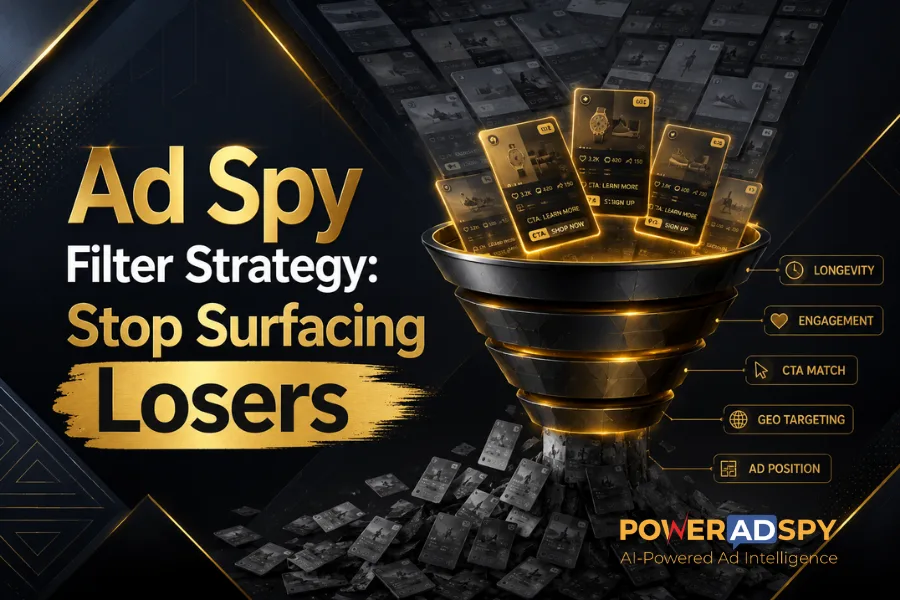
Here’s the exact order I use. Each step narrows the result set to ads that have demonstrated real-world proof of working.
Step 1: Sort by “Running Longest” First
Before you touch any filter, change the sort order. PowerAdSpy’s sorting options include Newest, Last Seen, Running Longest, and Domain Registration Date. Switch to Running Longest immediately.
The logic is simple: advertisers kill ads that don’t convert. An ad running for weeks or months is one someone is paying to keep alive — because it’s returning value. This single sort change eliminates the graveyard of failed tests from your view. Everything in your results is now a survivor.
Step 2: Layer in Engagement-Oriented Details
Longevity alone isn’t enough. An ad could run a long time on a tiny budget to a niche audience. Cross-reference with PowerAdSpy’s Engagement-Oriented Details—the platform surfaces likes, shares, and comments at the ad level. You can also sort by shares, likes, and comments directly.
Shares matter most. A share is a voluntary act — someone found the ad persuasive enough to redistribute it from their own account. That’s a proxy signal for creative quality that no impressions metric can fake. Filter for high share counts after you’ve already sorted by Running Longest, and you’re looking at ads that are both durable and resonant.
Step 3: Use Call to Action Based Sorting to Match Intent
This is the step almost nobody takes, and it saves the most time. PowerAdSpy’s Call to Action Based Sorting lets you filter by the specific CTA type an ad uses — “Shop Now,” “Learn More,” “Sign Up,” and so on.
Why does this matter? A “Learn More” ad is doing a different job than a “Shop Now” ad. If you’re building a retargeting campaign aimed at bottom-of-funnel buyers, studying an awareness-stage “Learn More” ad is irrelevant research. Matching CTA type to your campaign stage means every ad you study is actually comparable to what you’re building. It sounds obvious. Almost no one does it.
Step 4: Apply GEO-Targeted Competitor Data
PowerAdSpy covers 100+ countries — specifically, its ad filtering works across 149+ countries with demography and location filters. Use this.
An ad crushing it in the US may be completely untested in the UK, Canada, or Australia — and vice versa. If your target market is Germany, studying a high-engagement ad that ran exclusively to US audiences tells you very little about the copy and creative conventions that will land for your buyer. Narrow your GEO filter to your actual target market before pulling inspiration. The GEO-targeted competitor data feature exists precisely for this; treating it as optional is leaving serious research value on the table.
Step 5: Filter by Ad Position
PowerAdSpy’s Filter By Ad Positions — separating News Feed from Side Location — sounds like a minor toggle. It isn’t. News Feed ads and sidebar ads operate under completely different visual hierarchies and attention patterns. A sidebar ad has to work as a thumbnail with minimal copy. A News Feed ad can carry more creative weight. If you’re building for one placement, studying the other is actively misleading research.
This matters especially when platforms shift delivery. Facebook’s ad delivery system can be finicky — edits to active ads, landing page issues, or targeting category restrictions can all disrupt where your ad actually serves. Knowing what works in each position separately gives you more flexibility when delivery behaves unexpectedly.
The Filter Mistake That Kills Research Quality
There’s a known failure mode in search systems that applies directly here: overly restrictive or conflicting filters eliminate relevant content while letting irrelevant content through. This isn’t a hypothetical — poorly implemented filter logic consistently surfaces irrelevant results even when the underlying database is rich.
The practical version of this mistake: stacking too many filters simultaneously on your first pass. Filter by keyword AND CTA type AND specific ad format AND a tight date range all at once, and you may end up with three results — then draw conclusions from a sample size that means nothing. Start broad (Running Longest plus your GEO filter), let the result set breathe, then layer additional filters one at a time as you narrow toward your specific use case.
The opposite error is just as bad. Searching with no filters at all is a fast path to copying dead competitor ads — one of the most consistent ways to import someone else’s already-failed hypothesis into your own campaign. The archive doesn’t distinguish between a three-day test and a three-month control unless you specifically ask it to.
Where This Workflow Applies Beyond Facebook
Everything above works across all 10 networks PowerAdSpy covers. The Quora module, for instance, indexes 3M+ Quora ads across 100+ countries in four ad formats — text, image, video, and promoted answers — with its own filter stack including ad type, funnel type, affiliate network, and device. The same “Running Longest first, then engagement, then CTA match” logic applies. The parameters differ; the sequencing discipline doesn’t.
For ecommerce teams using the Shopify store owner search — a genuine workflow where you search and find engaging ads run by Shopify store owners — the CTA filter becomes even more critical. Ecommerce CTAs cluster heavily around “Shop Now” and “Buy Now.” Sort by engagement within that CTA category, filtered to Running Longest, and you get a shortlist of ads that have demonstrably moved product. That’s the research input worth studying.
What to Do After You Find the Right Ads
Once you’ve applied this filter sequence and surfaced a credible shortlist, PowerAdSpy’s Bookmark The Best Ads feature becomes your working file. Don’t treat it as a favorites list — treat it as a structured creative brief. Group bookmarks by CTA type, by platform, by angle. The ad analytics display (first-seen and last-seen dates, post date, targeted countries) gives you additional context for each saved ad.
For video ads specifically, the platform lets you download video ads for use in your own campaign research. Review the structure: where does the hook land, at what second does the CTA appear, what’s the ratio of problem-framing to solution? Those are the transferable insights. The goal is reverse-engineering the structure, not duplicating the creative.
If you want to go deeper on using competitor data to build a full competitor marketing plan, the filter discipline above is the foundation. You cannot build a useful model from a noisy input set.
Read More!
Competitor Ad Analysis: A Pattern-Extraction Framework
The Ad Research Mistake That Kills Your ROI
The Five-Step Version, Plain
Sort by Running Longest. Add engagement signals. Match CTA type to your campaign stage. Narrow by GEO. Filter by placement. Add other constraints one at a time. Bookmark only ads that pass all five gates.
Every step you skip is a step toward spending real budget testing someone else’s already-failed hypothesis.
Start your free PowerAdSpy trial and run this filter sequence on your next competitor research session — the gap between your first raw search and your filtered result is the gap between a searchable archive and actual intelligence.