The single most expensive habit in paid media is to copy new ads from a competitor’s newest creative. Modelling proven winners is the whole point of ad intelligence, but new is not the same as proven. An ad launched three days ago is an experiment. An ad still running after forty days is a paid invoice. Someone is paying real money to keep it live, which means the numbers are working.
Most teams get this backwards. They sort by “newest” and try to stay ahead of the curve. Meanwhile, the actual curve- the ad that survived audience fatigue, budget scrutiny, and a dozen creative reviews- is sitting right there in the data, ignored.
This article is about one specific workflow for fixing that. It centres on a filter most users scroll past.
Why Longevity Is the Strongest Profit Signal
Advertisers kill ads that don’t work. That’s the whole game. If a creative is burning budget without returning revenue, it gets paused, usually within days. So an ad that’s been running continuously for a month or more has cleared a gauntlet that most creatives fail.
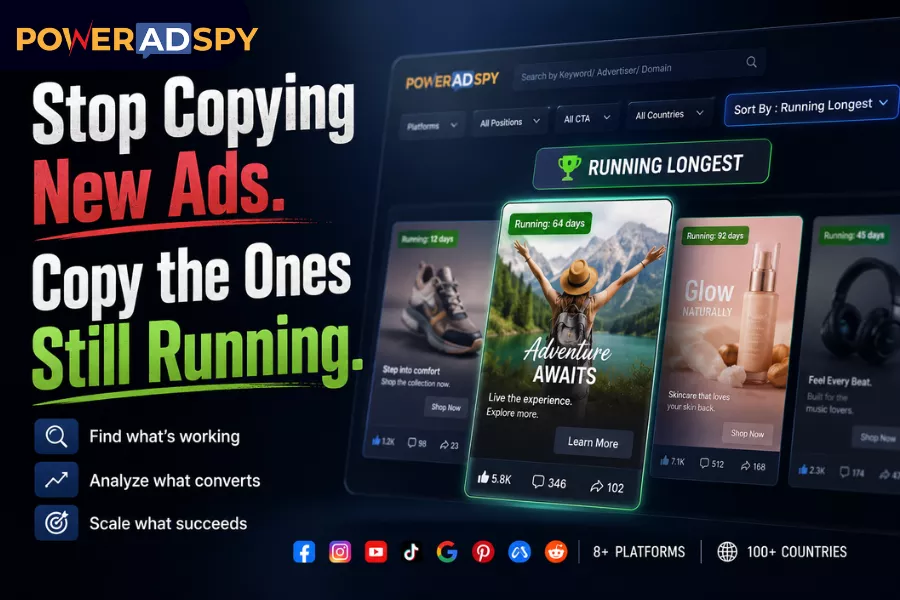
PowerAdSpy makes this signal explicit. The platform’s Sort By > Running Longest filter surfaces ads ordered by how long they have been continuously active. PowerAdSpy’s own documentation describes these long-running ads as ones that “usually perform the best on any platform,” , not a marketing claim, but a description of the filter’s underlying logic: duration as a proxy for profitability.
The insight compounds when you consider the scale of what you’re searching. PowerAdSpy has indexed 500M+ ads across 10 ad platform networks: Facebook, Instagram, Google PPC, YouTube, Native, Display Network, Reddit, Quora, Pinterest, and LinkedIn, with 500K+ new ads added daily. That volume means the “longest-running” pool at any moment is genuinely competitive. You’re not looking at one market’s winners. You’re looking at the survivors across a hundred.
The Workflow: Finding 30-Day Survivors
Here’s the exact sequence. It takes under ten minutes once you’ve run it a couple of times.
Step 1 — Set your keyword and scope
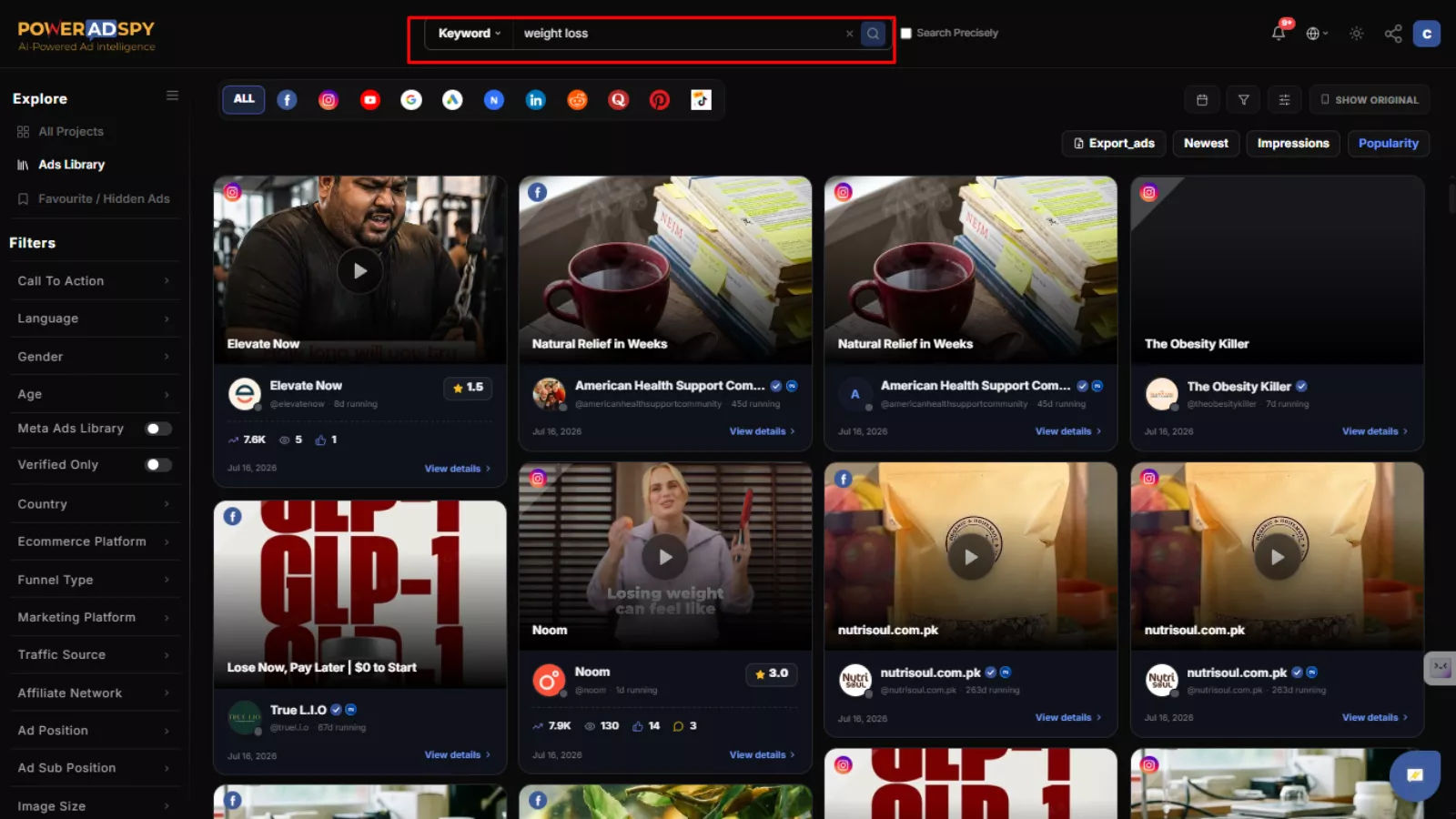
Start with a keyword or competitor domain search. Be specific at first: a product category, a pain point phrase, a brand name you’re tracking. Be specific at first: a product category, a pain point phrase, a brand name you’re tracking, or examples of creatives you want to analyze before you copy new ads strategically. PowerAdSpy lets you toggle between exact-match and broad results, so if a narrow search returns too few ads, you can widen without starting over.
If you’re researching a Shopify competitor, search by their domain directly. The platform surfaces their ads with full engagement details attached: shares, likes, comments, which you’ll use in Step 3.
Step 2 — Apply “Running Longest” and layer your time filters
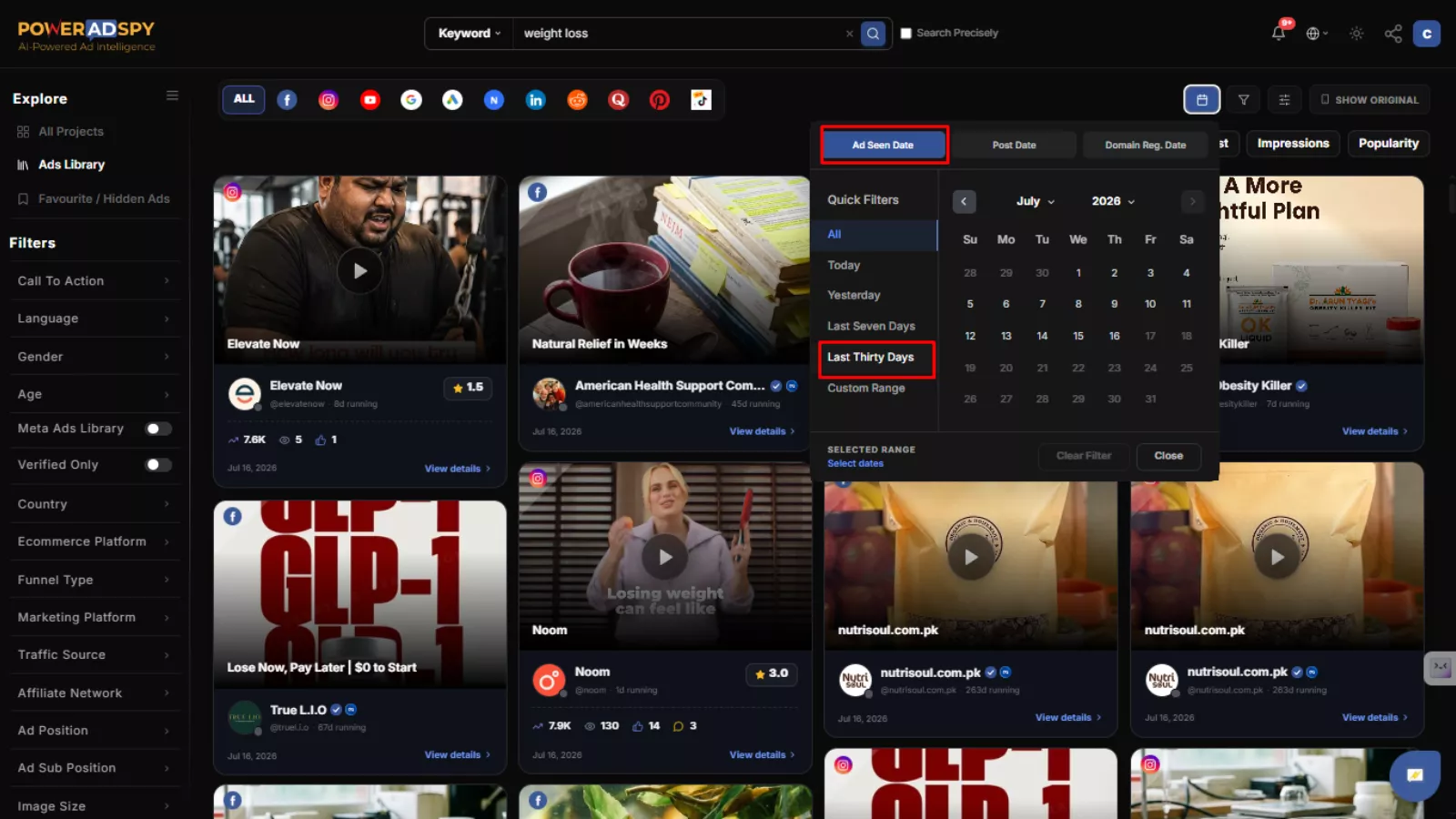
Sort by Running Longest. Then set the Ad Seen Between filter to at least 30 days back; this defines the window in which PowerAdSpy first detected the ad. Cross-reference with the Post Date Between filter to confirm the original publish date aligns. What you’re looking for: ads that were first posted 30+ days ago AND are still being detected as active now.
That intersection is your “30-day survivor” pool. An ad detected continuously across that window has been funded for a month. At typical CPMs, that’s not an accident.
Step 3 — Cross-score with social engagement
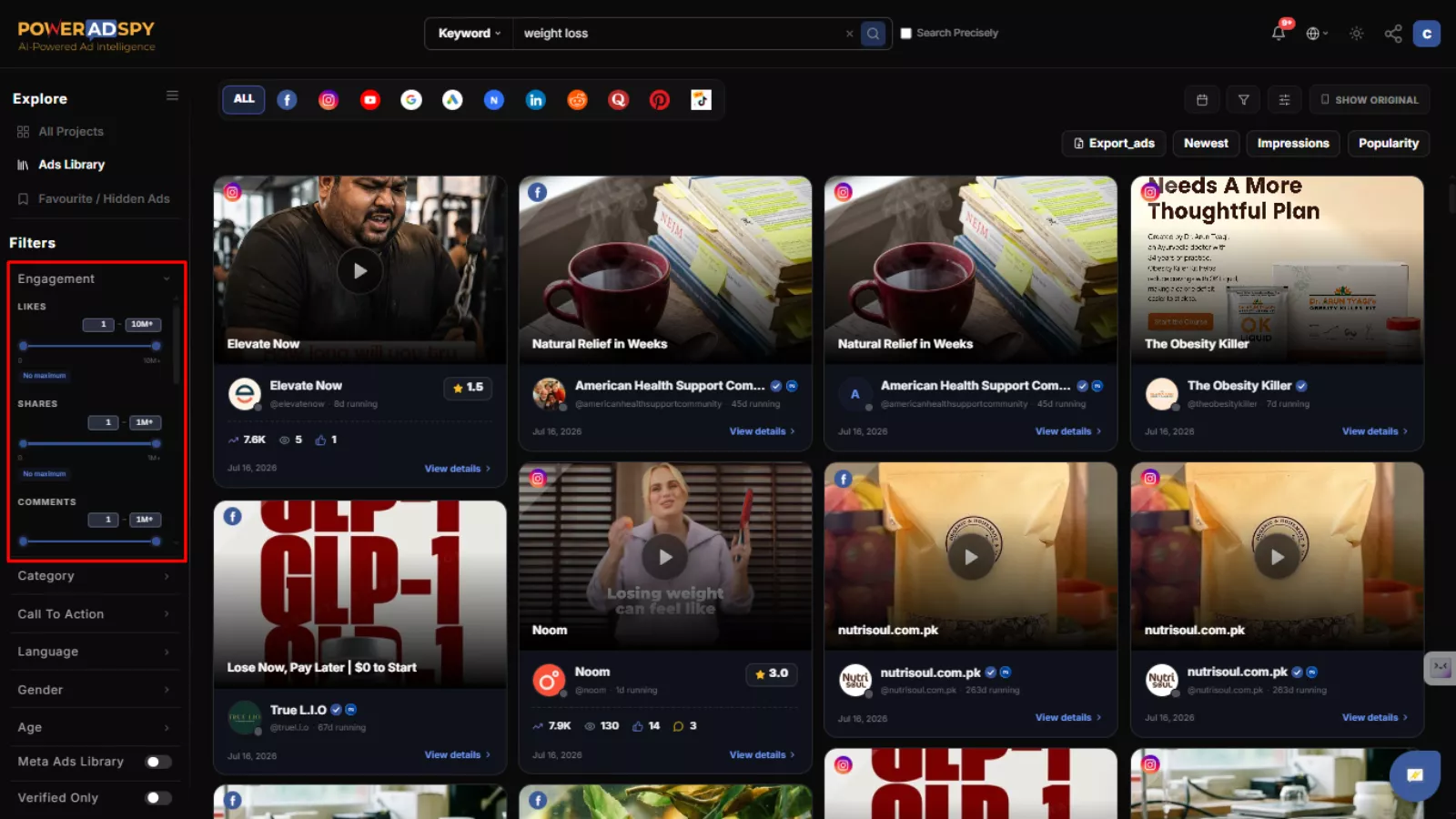 Duration alone doesn’t tell the whole story. An ad can run on a tiny budget for months without moving product. Use the Sort By Social Shares filter to specify a numeric floor for likes, shares, and comments.
One caveat: if you’re researching a local or niche brand, set the engagement floor lower than you would for a national account. A regional brand running a successful awareness campaign will show far fewer interactions than a D2C giant; the signal is relative to market size, not absolute. PowerAdSpy’s own documentation flags this; local brand research requires adjusting the bar accordingly.
Step 4 — Filter by position and call-to-action
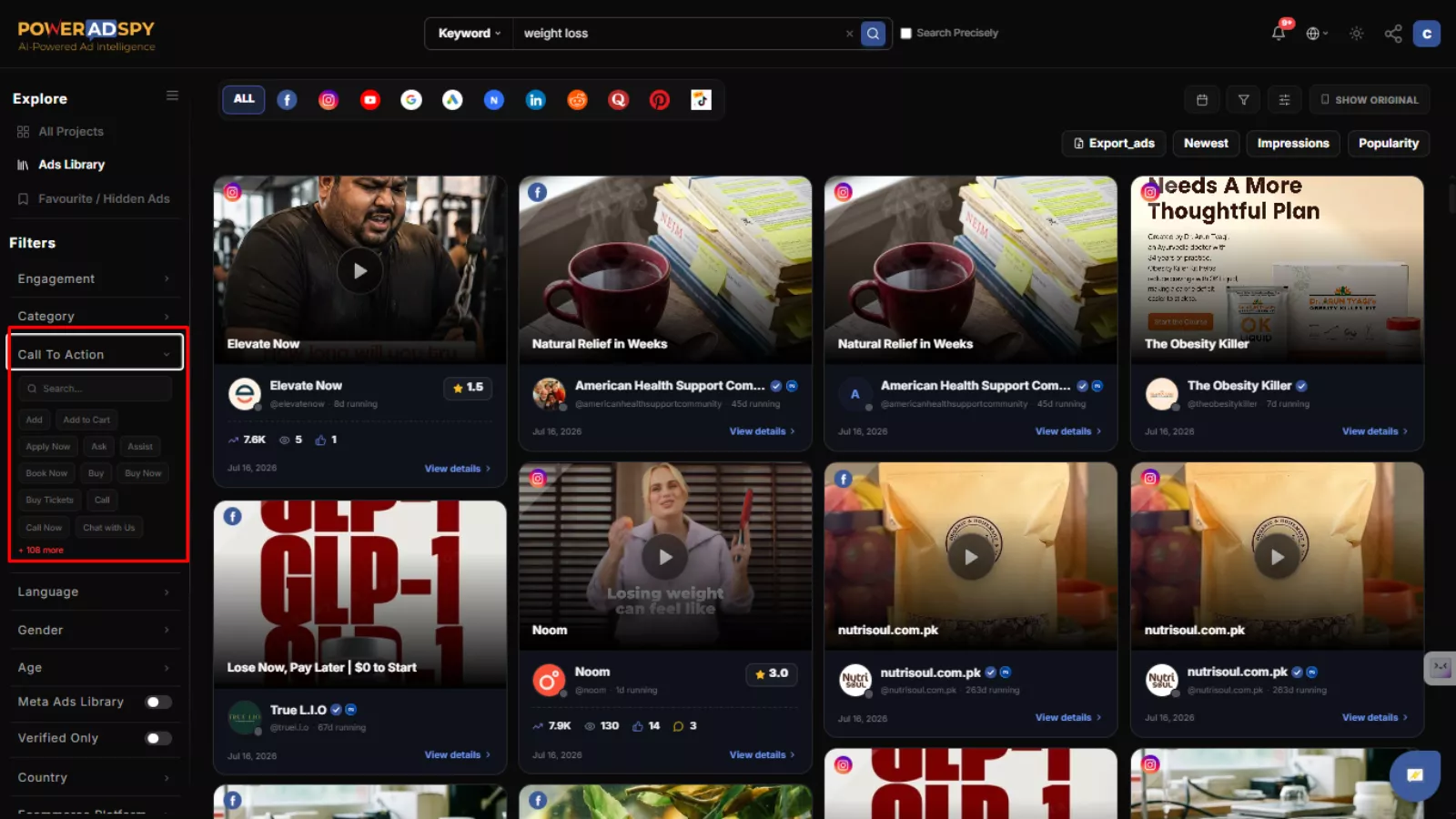
Now narrow by intent. Use Filter By Ad Positions (News Feed vs. Side Location) to match placement context. A sidebar ad and a News Feed ad are doing different jobs; don’t mix them when you’re trying to model creative structure before you copy new ads.
Then use Call to Action Based Sorting to filter by CTA type. “Shop Now,” “Learn More,” and “Sign Up” represent entirely different funnel stages. Sorting for “Shop Now” ads within the 30-day survivor pool gives you a genuinely focused comparison set if you’re modelling bottom-of-funnel direct-response creative.
Step 5 — Dig into the landing page, not just the ad
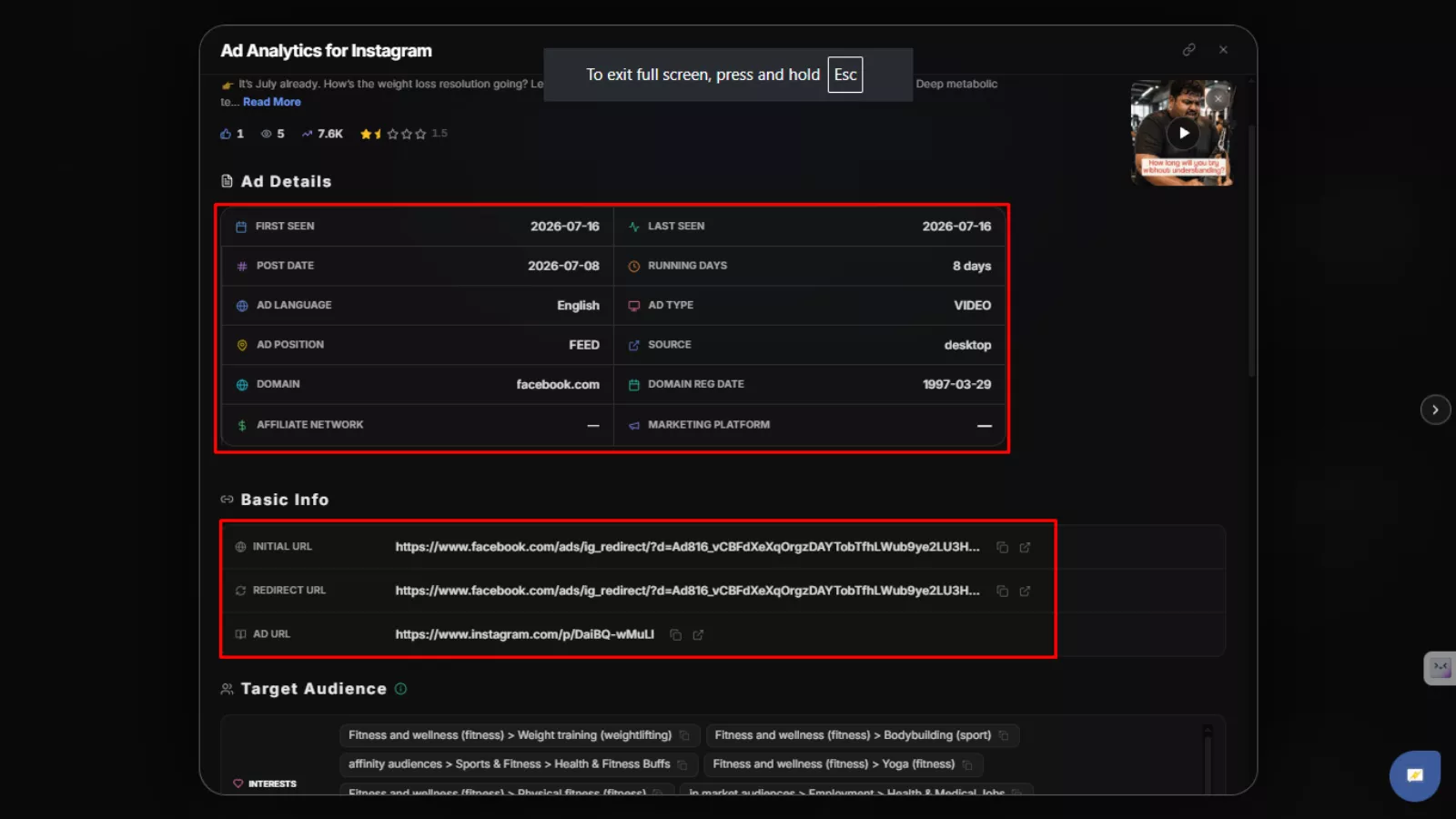 The ad is the hook. The landing page is where the money either gets made or lost. PowerAdSpy’s lander filters let you sort by eCommerce platform, funnel type, marketing platform, and traffic source (desktop, Android, iOS). A winning Facebook ad pointing to a Shopify store structured around a specific funnel tells you something concrete about the whole conversion architecture, not just the copy.
When you find a combination of long-running creative + high engagement + coherent lander setup, that’s the blueprint worth studying.
Step 6 — Bookmark and track
Use the Bookmark The Best Ads feature to save anything that clears all five filters. Then add the advertiser to a Watchlist. If they launch a new creative in the next few weeks, you’ll see it, and you’ll have context on what they were running before, which makes pattern recognition much faster.
Also Read
Competitive Advertising Tracking- Everything You Need To Know
What Is Competitor Ads Analysis And Why Is It Important
What This Workflow Actually Tells You (And What It Doesn’t)
The Running Longest method answers one question well: what is provably working right now, for a competitor, at scale? That’s valuable. But it has limits worth being honest about, especially if your goal is to copy new ads based solely on recency rather than performance.
Duration as a signal assumes advertisers are rational actors who kill non-performing ads promptly. Most sophisticated teams are. But a brand with a large budget and loose attribution practices might run an underperforming ad longer than they should. The engagement cross-score in Step 3 is your check on this; a long-running ad with weak engagement on a national brand budget is a yellow flag.
There’s also a platform depth consideration. PowerAdSpy collects and displays ads from over 20 million sources across eight platforms. Coverage across 100+ countries means the GEO-targeted competitor data is genuinely useful for cross-market research. But as with any ad intelligence tool, some networks yield richer data than others depending on how aggressively a market is crawled. Use the Running Longest filter where the data density is highest; Facebook and Instagram tend to be the deepest pools for most verticals.
The Detail Most Teams Miss: Image Search Within Ads
Once you’ve found your survivor ads, take the creative analysis one step further. PowerAdSpy’s Search By feature lets you search for texts, brands, objects, and even celebrities within ad images; the platform describes this as “something that no other ad research platform does.”
Say a competitor’s long-running ad uses a specific visual motif, a before/after split, a lifestyle scene with a recognisable object, a recurring colour palette. You can search for other ads using those same visual cues across the entire index. This surfaces patterns you’d never catch reviewing creatives one at a time. When multiple long-running ads from different advertisers share the same visual structure, that’s not coincidence. That’s a format the algorithm rewards.
A Note on Creative Cycle Compression
The practical argument for this whole workflow is speed. Finding, testing, iterating, and scaling a new creative from scratch takes weeks and real budget. The Running Longest filter compresses that cycle by front-loading the answer: here are the formats that are already working, in your category, for a competitor with real skin in the game. You’re not guessing at what might work. You’re reverse-engineering what demonstrably does.
For agencies managing mobile and native ad placements especially, this matters; creative fatigue hits faster on mobile, and the pressure to refresh is constant. Having a structured method for finding proven formats rather than brainstorming cold is the difference between a weeks-long creative cycle and a days-long one.
If you want a deeper look at how the full filter set works in practice, the platform’s own guide on finding the best ads using PowerAdSpy covers the complete filter stack in detail.
Start With the Survivors
The marketers who consistently outperform aren’t the ones with the best creative instincts. They’re the ones who’ve built a systematic way of finding what already works and understanding why. The Running Longest filter is one of the most direct expressions of that principle in any ad intelligence tool available today.
Sort by newest if you want to feel current. Sort by Running Longest if you want to win.
Start your free PowerAdSpy trial, no credit card required, and run the 30-day survivor filter in your niche today. The proof is already in the data.