
The Ultimate Meta Ad Library Guide For 2026
If you run paid social media campaigns, manage a brand’s advertising, or research competitors, the meta ad library is one of the most powerful free tools available to you. It gives transparent, searchable access to every ad currently running across Meta’s platforms, Facebook, Instagram, Messenger, and the Audience Network, along with a historical archive of ads that have run in the past.
Most marketers use it superficially: they search a competitor’s brand name, browse a few ads, and move on. This guide goes significantly further, covering how the library works at a technical level, how to use the Meta Ad Library search for genuine competitive intelligence, what the API makes possible for teams that want to automate their research, and the advanced strategies that experienced media buyers use to extract signal from the data.
This is the complete 2026 reference for anyone who wants to use the meta ad library seriously.
Listen to this blog:
What Is the Meta Ad Library?
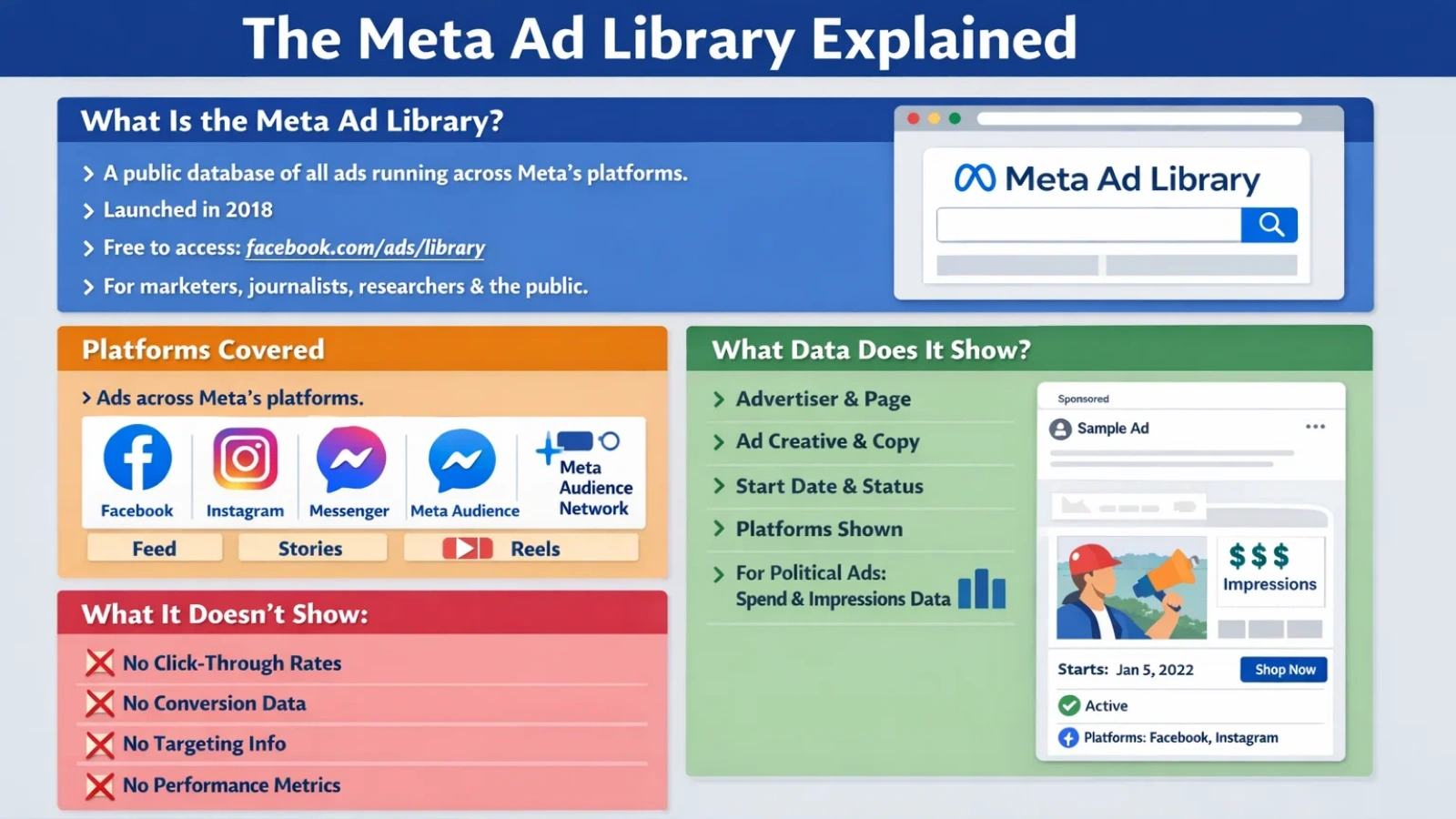
The Meta Ad Library is a publicly accessible database that stores information about all ads currently running across Meta’s advertising network. It was launched in 2018 as part of Meta’s response to pressure for greater advertising transparency, particularly around political ads, and has since expanded into a comprehensive tool covering all ad categories.
Access is free, requires no login for basic search, and is available at facebook.com/ads/library. Anyone, marketers, journalists, researchers, regulators, or curious members of the public, can search and view ads without an account.
What Platforms Does the Meta Ad Library Covers
The library covers ads served across all of Meta’s owned platforms and placements, including Facebook Feed, Facebook Stories, Instagram Feed, Instagram Stories, Instagram Reels, Messenger, and Meta Audience Network. When you view an ad in the library, the platform placements it was delivered to are listed in the ad details panel.
What Data the Meta Ad Library Shows
For each ad, the library displays the advertiser name and linked Facebook Page, the ad creative (image, video, or carousel), the ad copy and headline, the date the ad started running, whether the ad is currently active or has stopped, the platforms it was served on, and, for political and issue ads, estimated spend ranges and impression data by region and demographic.
What it does not show is equally important: there are no performance metrics, no click-through rates, no conversion data, and no precise targeting information. The library is a transparency tool, not an analytics platform.
Is the Meta Ad Library Free?
Yes, entirely. The UI is free to access with no account required for commercial ad searches. The API is also free to access but requires a verified Meta developer account and, for certain data types (political ads, spending data), additional permissions. There are rate limits on API access, but no paywalled tiers.
Meta Ad Library vs Facebook Ad Library: What’s the Difference?
The short answer: they are the same tool. The Facebook ad library was rebranded to the Meta ad library when Meta Platforms was established as the parent company in 2021. The URL (facebook.com/ads/library) remained unchanged, which is why both terms remain in active use.
Why Marketers Still Search Facebook Ad Library
“Facebook ad library” still generates significantly more search volume than “meta ad library” in most markets, hand, and brand familiarity drives the continued use of the old name. Both terms refer to the same product. If you’re creating content or documentation for a team, using both terms interchangeably or clarifying the equivalence upfront avoids confusion.
Has Anything Changed in 2026?
The core functionality has remained consistent, but Meta has continued expanding the library’s coverage and improving its search capabilities. Notable recent developments include broader coverage of AI-generated ad labels, improved regional data for EU advertisers under the Digital Services Act transparency requirements, and updated API endpoints with additional demographic fields for political ad research. The library’s role in regulatory compliance has grown, particularly in Europe, which has driven some of the data expansion.
Political And Social Issue Ads In The Meta Ad Library
Political and social issue ads receive significantly more transparency in the meta ad library than commercial ads. This is by design; Meta introduced enhanced disclosure requirements for these categories following criticism over political advertising practices.
The 7-Year Archive Rule
All ads classified as political or related to social issues, elections, or politics are archived for seven years from the date they last ran. This is a regulatory requirement in many jurisdictions and makes the library a genuine historical research tool for journalists, academic researchers, and political analysts. Commercial ads have no mandated retention period and may disappear from the library when they stop running or after an unspecified period.
Spend and Impression Estimates
Political ads include estimated spend ranges (lower and upper bounds), and impression ranges broken down by region, age group, and gender. These are estimates rather than exact figures; Meta uses ranges rather than precise numbers, but they provide a meaningful signal about campaign scale and targeting priorities. A political ad with a wide age distribution and national spend suggests a broad awareness campaign; concentrated spend in a specific region with a narrow demographic suggests a targeted persuasion effort.
EU Transparency Requirements
Under the EU’s Digital Services Act, advertisers targeting EU users face additional disclosure requirements that are reflected in the meta ad library’s data for those regions. EU users and researchers can access more detailed targeting parameter data for ads served in EU countries than is available for other regions. This has made the EU version of the library particularly valuable for transparency research.
Also Read!
How to Use a TikTok Ads Spy Tool to Discover Viral Campaigns?
How To Use Meta Ad Library Search Like a Pro
The meta ad library search interface is more capable than most users realize. The default experience, searching by brand name and browsing results, is just the starting point.
How to Search by Brand Name and Keyword
Searching by advertiser name returns all currently active ads for that brand or page. This is useful for monitoring specific competitors. Keyword search works differently; it searches the ad copy and creative text for the entered term, returning all ads across all advertisers that include that keyword. Keyword search is often more valuable than brand search for market research because it surfaces the full competitive landscape for a category or offer type, not just a single advertiser.
Example: searching “free trial” in your category returns every advertiser currently using that offer structure, allowing you to benchmark whether free trial positioning is mainstream or differentiated in your space.
How to Filter by Country and Category
Country filtering is essential for international research and for isolating relevant markets. The library defaults to the country associated with your IP address. Switching countries reveals what competitors are running in specific markets, often with different creative, different offers, and different angles than their domestic campaign managers. Category filtering (All Ads, Housing, Employment, Credit, Social Issues) narrows results to specific regulated ad types.
How to Find Winning Ads Using Meta Ad Library Search
The most reliable proxy for ad performance in the library is ad longevity. Ads that have been running for weeks or months without stopping are almost certainly profitable; no advertiser keeps spending on a losing creative. Filter search results by the oldest start date to surface the ads in your category that have been running the longest. These are your primary references for what’s working.
Secondary signals include creative volume; advertisers running many variations of the same concept are in active testing mode, which means that concept is in their consideration set. When multiple unrelated advertisers converge on the same offer angle or visual format, that’s a market-level signal worth paying attention to.
Common Meta Ad Library Search Mistakes
- Searching only for direct competitors, keyword search across the whole category reveals angles and offers that brand-level search misses
- Ignoring inactive ads, stopped ads that ran for a long time are still useful creative references, even if they are no longer live
- Assuming the library shows everything, ads may take time to appear after launch, and some ad formats have delayed indexing
- Focusing only on big brands, smaller advertisers often test more aggressively and can surface emerging creative formats before they become mainstream
How To Spy On Competitor Ads Using The Meta Ad Library
Systematic competitor research using the meta ad library goes well beyond casual browsing. Here’s a structured approach that experienced media buyers use to extract actionable intelligence.
Finding Long-Running Ads, The Scaling Signal
Sort competitor ads by oldest first. Any ad that has been running for more than four to six weeks in a performance marketing context is almost certainly profitable. These are the creatives worth studying in detail: the hook, the offer structure, the visual format, and the call to action. If an advertiser has one ad that’s been running for three months alongside twenty newer variations, the long-running ad is their control. Everything else is being tested against it.
Identifying Creative Angles and Hooks
Look at the first three seconds of video ads or the primary headline of static ads; this is the hook. Categorize competitor hooks into types: problem-agitation (“Tired of X?”), social proof (“50,000 customers…”), curiosity (“The thing no one tells you about X”), direct offer (“50% off today only”). When one hook type dominates across multiple advertisers, it reflects what the audience responds to. When one advertiser uses a hook type that nobody else is using, that’s a potential differentiation opportunity.
Analyzing Offer Structures and Landing Pages
The ad creative tells you the hook; the landing page tells you the full offer structure. Click through from library ads to the destination URL and document: the headline, the social proof elements, the price point and framing, the risk-reversal mechanism (guarantee, free trial, free shipping). Patterns across multiple competitors indicate category norms; deviating from them requires strong justification, but matching them provides a baseline that’s likely to convert.
Spotting Seasonal Campaign Patterns
The meta ad library’s date filtering allows you to observe when specific advertisers ramp up spend (more ads launching in a short period) and pull back. This reveals seasonal patterns, when competitors increase creative output before major shopping periods, when they test new angles in slow seasons, and when they run clearance or retention-focused campaigns versus acquisition-focused ones. Building a calendar of competitor campaign patterns over several months gives you a meaningful planning advantage.
Meta Ad Library API Documentation: Complete Guide
The meta ad library api documentation covers a programmatic interface that allows developers and data teams to query the library at scale, pulling ad data, filtering by multiple parameters simultaneously, and storing results for ongoing analysis. For teams that want to monitor more than a handful of advertisers or build competitive intelligence dashboards, the API is significantly more capable than the manual UI.
Who Can Access the Meta Ad Library API
Basic API access requires a Meta developer account and an access token generated through the Meta developer portal. For commercial ad data, this level of access is sufficient. For political ad data, including spend and impression estimates, additional permissions are required, typically verification of identity and confirmation of research purpose. The approval process for enhanced permissions can take several days to weeks.
Key Endpoints and Data Fields
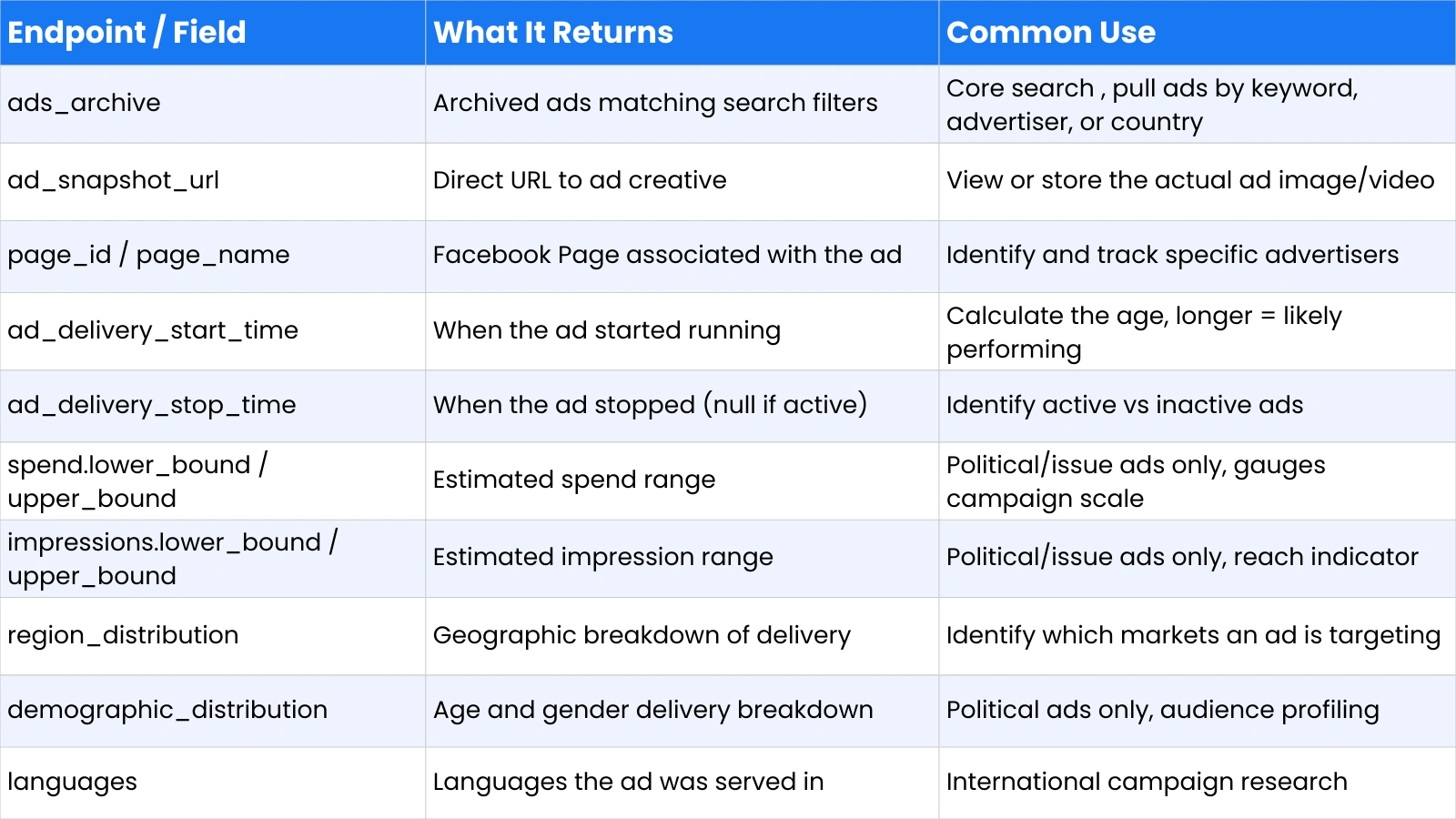
The primary endpoint is ads_archive, which accepts search parameters and returns matching ad records. The table below covers the most useful fields available in the API response:
Rate Limits and Practical Considerations
The API enforces rate limits that vary by access level and endpoint. Standard access allows a limited number of calls per hour; sustained high-volume querying requires throttling logic in your implementation. Results are paginated, and large queries return a cursor for subsequent page requests. The API data and the UI data are not always perfectly synchronized; newly launched ads may appear in one before the other, and some edge cases produce discrepancies between UI display and API response.
Automating Competitor Tracking With the API
The most practical use of the API for marketing teams is automated monitoring: scheduled queries that pull new ads from a watchlist of competitor pages daily, flag new creative launches, and store ad data in a structured database for trend analysis. A basic implementation requires a list of target page IDs, a cron job running the ads_archive query, and a storage layer, a simple database or even a spreadsheet connected via export, for accumulating the results over time. This produces a longitudinal competitive intelligence dataset that manual browsing cannot replicate.
What The Meta Ad Library Does NOT Show: Limitations and Workarounds
The meta ad library is a transparency tool built to satisfy regulatory requirements and public interest in advertising accountability. It was not designed to be a marketing intelligence platform, and understanding its limitations is as important as understanding its capabilities.
Why Performance Metrics Are Hidden
Meta does not expose click-through rates, conversion rates, cost-per-click, or return on ad spend through the library, for any ad type. This is a deliberate design choice: exposing competitor performance data would create competitive harm and almost certainly face legal challenges. The workaround is inference: ad age is the most reliable proxy for performance, creative volume signals active testing, and landing page sophistication (strong guarantees, detailed social proof, clear pricing) suggests a brand that has iterated to a converting offer.
Missing Targeting Data
The library shows where ads were delivered geographically and, for political ads, demographic breakdowns, but it does not reveal interest targeting, behavioral targeting, custom audience usage, or lookalike audience parameters. You can see that an ad ran in the US, but not that it was targeted to women aged 35 to 54 interested in home renovation. For commercial ads, this information remains entirely private.
Advanced Meta Ad Library Strategies for Media Buyers and E-commerce Brands
The following strategies represent how experienced media buyers and e-commerce teams extract competitive advantage from systematic meta ad library research, going well beyond the basic search functionality.
Identifying Creative Testing Patterns
Advertisers in active testing mode launch multiple ad variations in rapid succession. When you see a brand push out ten to fifteen ads within a short window, all featuring the same product but with different hooks, visuals, or copy angles, they’re in a testing phase. The ads that survive, the ones still running two to four weeks later, are the winners. Monitoring this process across several competitors builds a real-time picture of which creative approaches are passing market validation in your category.
Detecting AI-Generated Ad Variations
AI-assisted creative generation has become standard practice for large advertisers. In the library, this shows up as large clusters of ads with near-identical structure but slight copy or visual variations, often with a mechanical consistency in formatting that manual creative work rarely produces. Recognizing this pattern tells you a competitor is using generative tools at scale, which means their creative testing volume is higher than it appears from ad count alone.
Finding Winning Product Angles for E-commerce
For e-commerce brands, the library is most valuable for identifying which product angles are driving conversions at scale. Search your product category and filter by the oldest ads first. The long-running ads reveal the angles the market has validated: transformation (before/after outcomes), social proof (customer count, reviews, user-generated content), authority (expert endorsements, press coverage), or urgency (limited time, limited stock). When multiple advertisers converge on the same angle, it’s a market-validated approach. When one advertiser uses an angle no one else is running, it’s either a blue ocean opportunity or a failed experiment; ad longevity tells you which.
Analyzing UGC Ads and Offer Structures
User-generated content ads have become dominant in e-commerce because they produce lower CPMs and higher engagement than polished studio creatives. In the library, UGC ads are identifiable by their vertical format, phone-recorded aesthetic, and first-person testimonial structure. Analyzing which UGC formats competitors are scaling, talking head testimonials, unboxing videos, band efore-and-after demonstrations tells you which authentic content formats are resonating in your category.
Offer analysis in the library reveals category pricing norms: are competitors leading with percentage discounts, flat dollar savings, bundle deals, subscription pricing, or free-plus-shipping models? When a particular offer structure dominates across multiple advertisers, it reflects buyer psychology in that category. Testing against category norms requires a strong rationale, but knowing the norms is a prerequisite for that decision.
Building a Swipe File From Ad Library Meta
A swipe file is a curated collection of reference ads that inspire and inform creative development. Building one from ad library metadata is more systematic than saving ads you happen to see in your personal feed: use keyword search to find ads in your category, filter by longevity, and save the best examples with notes on why they work, the specific hook mechanism, the offer structure, the visual format, and the social proof element. A well-maintained swipe file of fifty to one hundred reference ads across two to three months of active monitoring is one of the most useful creative planning tools available.
The Future Of The Meta Ad Library In 2026 And Beyond
The meta ad library’s trajectory is shaped by two forces pulling in different directions: regulatory pressure demanding more transparency, and advertiser resistance to competitive exposure. The balance between them will determine how much the library’s capabilities expand.
AI-Generated Ads and Automation Disclosure
Meta has begun labeling AI-generated ad content in some markets, and this labeling is beginning to surface in the library. As AI-assisted creative becomes the norm rather than the exception, the library may evolve to include generation-method metadata, whether an ad was AI-generated, human-created, or a hybrid. This would add a new research dimension for teams tracking creative production trends across competitors.
Transparency Regulations and Global Expansion
The EU’s Digital Services Act has already pushed Meta toward greater disclosure for EU-targeted ads, and similar regulatory frameworks are developing in the UK, Canada, and parts of Asia-Pacific. As these regulations take effect, the library’s data richness for regulated markets will likely increase, with more targeted parameter disclosure, more spend transparency, and potentially mandatory performance reporting in some jurisdictions. Teams with international campaigns should monitor regulatory developments as a proxy for what library data will become available.
Ad Intelligence Tool for Deeper Competitor Research
While the Meta Ad Library is a powerful free transparency tool, PowerAdSpy is a paid ad intelligence platform built specifically for marketers who want deeper competitor insights and faster research.
PowerAdSpy collects and organizes ads from multiple advertising platforms into a searchable database. Instead of manually browsing ads one brand at a time, you can filter, sort, and analyze ads at scale to uncover patterns, winning creatives, and high-engagement campaigns.
It’s especially useful for agencies, media buyers, affiliate marketers, and e-commerce brands that need structured competitor research beyond what the Meta Ad Library alone provides.
Key Features of PowerAdSpy
- Multi-Platform Ad Database: Access ads from Facebook, Instagram Ads, Google, YouTube, Pinterest, Reddit, and more in one place.
- Advanced Search Filters: Search ads by keyword, advertiser name, domain, country, CTA, ad type, and engagement level.
- Engagement-Based Sorting: Find ads with high likes, shares, comments, or views to identify potentially strong-performing creatives.
- Competitor Tracking: Monitor specific brands and track newly launched ads automatically.
- Landing Page Insights: View associated landing pages to analyze full funnel structure, offers, and positioning.
- Creative Inspiration & Swipe Files: Save ads into collections to build structured swipe files for campaign planning.
Frequently Asked Questions About the Meta Ad Library
Is Meta Ad Library the same as Facebook Ad Library?
Yes. The Facebook ad library was rebranded to the Meta ad library in 2021 following Meta’s corporate rebrand. The URL (facebook.com/ads/library) and the underlying product are unchanged. Both terms refer to the same tool.
How far back does the Meta Ad Library go?
For political and social issue ads, the library archives data for seven years from the date an ad last ran, making it a genuine historical research tool for election and advocacy research. For commercial ads, there is no guaranteed retention period; ads may remain searchable after they stop running for an unspecified window, but the library is not a reliable long-term archive for commercial creatives.
Can you see ad performance in the Meta Ad Library?
No. The library does not show click-through rates, conversion rates, cost-per-click, ROAS, or any other performance metric for commercial ads. For political ads, estimated spend and impression ranges are available. Ad longevity, how long an ad has been running, is the most reliable performance proxy available in the library.
How do you access the Meta Ad Library API?
Create a Meta developer account at developers.facebook.com, generate an access token, and make requests to the ads_archive endpoint. Basic commercial ad data is accessible with standard permissions. Political ad data, including spend and impression estimates, requires additional permissions obtained through Meta’s verification process. Full Meta Ad Library API documentation is available at developers.facebook.com/docs/graph-api/reference/ads_archive.
Is the Meta Ad Library accurate?
The library is accurate for what it shows: active and recently inactive ads, creative content, advertiser identity, and delivery dates. It is not comprehensive: there can be delays between an ad launching and appearing in the library, some ad formats have inconsistent indexing, and the UI and API data are not always perfectly synchronized. Treat it as a reliable directional research tool rather than a complete real-time database.